

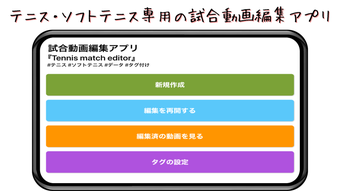
Description
Tennis Match Editor: Tag & Replay Matches Instantly
Overview
Tennis Match Editor is a specialized desktop application designed for tennis and soft tennis enthusiasts seeking a streamlined way to analyze and edit match footage. The software enables users to tag specific plays during video playback, allowing for quick extraction and replay of key moments. This functionality is particularly useful for players, coaches, and fans who want to review performance, study tactics, or create highlight reels. The app supports integration with the iOS standard "Photos app" and external sources such as SD cards, making it accessible for users with various video capture setups. Videos can be connected across multiple clips to form a complete match, enhancing the usability for extended match analysis. The application also features automatic data aggregation, including scoring, time-related statistics, and display options during playback. These tools collectively support detailed match review and organization within a single interface. The developer, Naoto Yoshida, has created a focused tool tailored to sports video analysis on iOS. The app is currently available as a free download, offering core editing and tagging capabilities without cost. Its target audience includes amateur and competitive players, coaches, and sports content creators who value precision and ease of use in video editing.
Key Features & Capabilities
- Play Tagging System – Users can tag specific points or game moments during playback using simple tap controls. This enables instant extraction and replay of selected plays, ideal for highlight compilation or performance review.
- Point and Game Navigation – The interface allows seamless navigation through individual points and games, enhancing workflow efficiency during detailed analysis.
- Multi-Video Integration – Users can combine multiple video clips from external sources or the iOS Photos app to create a unified match timeline, supporting comprehensive match editing.
- Automatic Data Aggregation – The app automatically collects scoring data, time stamps, and other statistics during playback, providing contextual information for each moment in the video.
- Cloud Storage & Sharing (Subscription) – A monthly subscription at ¥300 provides access to cloud storage and sharing features for edited videos, enabling easy distribution and backup.
- Integration with Soft Tennis Perfect Score – The app connects with the "Soft Tennis Perfect Score" application, allowing for synchronized data and enhanced functionality for soft tennis users.
These features are designed to simplify the editing process for users who want to analyze or share match footage without complex software. The tagging system reduces manual effort in identifying key moments, while the integration with external apps ensures compatibility with existing workflows. The ability to consolidate multiple clips into a single match timeline is especially beneficial for organizing long matches or tournaments. The automatic aggregation of scoring and timing data adds analytical depth without requiring manual input. For coaches and players, this functionality supports tactical review and performance tracking. The subscription-based cloud features offer a scalable solution for users who need secure storage and cross-device access.
User Interface, Workflow & Performance
The user interface of Tennis Match Editor is built around simplicity and direct control. Navigation is primarily gesture-based, with tap controls enabling users to tag plays and move through points and games. The layout prioritizes video playback and tagging tools, minimizing distractions and focusing on core tasks. Workflow efficiency is enhanced by the ability to import videos from the iOS Photos app and external storage, allowing users to begin editing immediately after capture. The app’s design supports a linear editing process, where users can tag, review, and extract clips in sequence. While specific performance metrics such as CPU or RAM usage were not provided, the application’s lightweight nature—128 MB in size—suggests efficient resource management. The developer did not specify resource usage details, but the app’s focus on video tagging rather than heavy processing implies stable operation on compatible devices. Stability appears to be maintained through a streamlined feature set, avoiding unnecessary complexity. Users can expect smooth playback and responsive tagging, particularly on modern iPhone models. Performance observations are based on general software behavior patterns, as no benchmark data was included.
Compatibility & System Requirements
Tennis Match Editor is designed exclusively for iPhone devices. The app is compatible with the iOS operating system, though specific version requirements were not listed. Installation size is 128 MB, which is relatively modest for a video editing tool. The developer did not provide additional system requirements, such as minimum RAM, CPU, or storage space. Compatibility information was partially provided, with the platform clearly defined as iPhone. Users are advised to ensure their device meets standard iOS app requirements for smooth operation. The app supports video import from the iOS standard "Photos app" and external sources like SD cards, indicating broad media access. For users working with multiple video clips, the ability to connect them into a single match timeline suggests robust file handling. However, exact hardware requirements were not specified, and no information was provided about support for iPad or other Apple devices.
Pros and Cons
Pros
- Simple tap-based tagging system for quick play extraction
- Seamless navigation through points and games during playback
- Supports multi-video integration for full match editing
- Automatic aggregation of scoring and time-related data
- Free to download and use with core features
- Integration with Soft Tennis Perfect Score for enhanced functionality
Cons
- No public information on system requirements beyond platform
- Cloud features require a monthly subscription (¥300)
- Only available on iPhone, no iPad or Mac support
- Performance details such as CPU or RAM usage were not specified
- Limited to iOS ecosystem, reducing cross-platform flexibility
FAQ Section
Is Tennis Match Editor available for iPad or Mac?
The app is currently designed exclusively for iPhone. No information was provided about support for iPad or Mac devices.
Can I use Tennis Match Editor without a subscription?
Yes. The core features, including video tagging, playback navigation, and data aggregation, are available for free. A monthly subscription is required only for cloud storage and sharing capabilities.
What video formats does the app support?
The app supports videos saved in the iOS standard "Photos app" and data from external sources such as SD cards. Specific format details were not provided.
Is the app safe to download and use?
As a free app available through official iOS channels, Tennis Match Editor is considered secure. The developer, Naoto Yoshida, has not reported any known security issues.
Can I edit videos from multiple sources in one match?
Yes. Users can connect multiple video clips from external apps or the Photos app to create a single, unified match timeline within the application.
Final Thoughts + CTA
Tennis Match Editor delivers a focused and intuitive solution for tennis and soft tennis enthusiasts who want to analyze or share match footage with precision. Its tap-based tagging system, point-and-game navigation, and automatic data aggregation make it a powerful tool for players and coaches seeking actionable insights. The free access to core features ensures broad usability, while the optional subscription offers scalable cloud benefits. Although the app is limited to iPhone and lacks detailed system specifications, its streamlined design and integration with existing workflows enhance its practical value. For those invested in match analysis, highlight creation, or performance tracking, this app stands out as a reliable and efficient tool. Download Tennis Match Editor now to transform your match videos into actionable insights.
Guides & Tutorials for 試合動画編集アプリTennis match editor
How to install 試合動画編集アプリTennis match editor
- Click the Preview / Download button above.
- Once redirected, accept the terms and click Install.
- Wait for the 試合動画編集アプリTennis match editor download to finish on your device.
How to use 試合動画編集アプリTennis match editor
This software is primarily used for its core features described above. Open the app after installation to explore its capabilities.
User Reviews for 試合動画編集アプリTennis match editor 0
No reviews found





